
HR software is used by employers in the United States to manage employee data, payroll tasks, hiring, benefits, time records, performance reviews, and other human resources work. It replaces many spreadsheets, paper files, email chains, and manual calculations with one organized system.
For a small business, HR software may handle basic employee records, onboarding, and time tracking. For a larger employer, it may connect payroll, benefits, recruiting, compliance reports, learning, scheduling, and workforce planning.
This guide explains what HR software does, how it works, what it cannot do, and how a U.S. employer can assess whether it is worth using.

What Is HR Software?
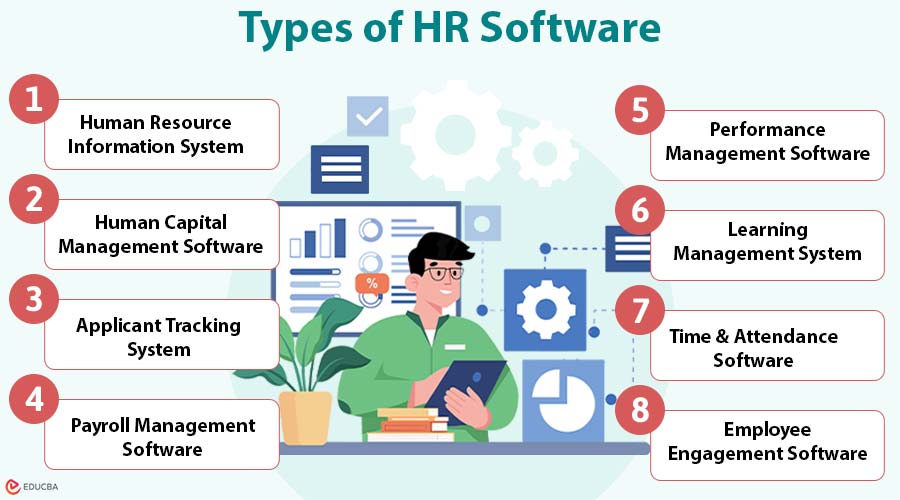
HR software is a digital system that stores, processes, and manages information about an organization’s workforce. The term may describe a simple employee database or a broad platform with payroll, benefits, recruiting, and workforce management tools.
Common names include:
- HRIS: Human resources information system
- HRMS: Human resources management system
- HCM: Human capital management system
- People operations software
- Employee management software
These terms often overlap. A basic HRIS may focus on employee records and core HR tasks. An HCM platform may include a wider set of tools, such as talent management, workforce planning, analytics, and learning.
The right name matters less than the functions the system provides. Employers should compare actual features, integrations, data controls, and service terms rather than rely on the label alone.
What information does HR software store?
An HR system may store:
- Employee names and contact details
- Job titles and department information
- Pay rates and salary history
- Work locations and employment status
- Tax forms and payment details
- Time and attendance records
- Benefits elections
- Performance notes and review records
- Training completion
- Leave and accommodation records
- Recruiting documents
- Signed policies and acknowledgments
Because this information can include Social Security numbers, bank details, medical information, and other sensitive data, access controls and security practices are essential.
What Is HR Software Used For?
HR software is used to organize employee information and automate repeatable HR processes. Its exact use depends on the product, configuration, company size, and connection to payroll or other systems.
1. Managing employee records
The central use of HR software is to create a single employee record. Authorized staff can update job details, pay information, work status, manager assignments, and documents in one place.
This can reduce duplicate entry. It can also help HR teams find current information more quickly than searching through separate files.
A good system should show:
- Who can view each type of record
- Who can change the record
- When a change occurred
- Whether the employee must review or approve it
- How long the data is retained
A digital record does not automatically mean the data is correct. HR teams still need a process for reviewing outdated addresses, job titles, pay rates, and emergency contacts.
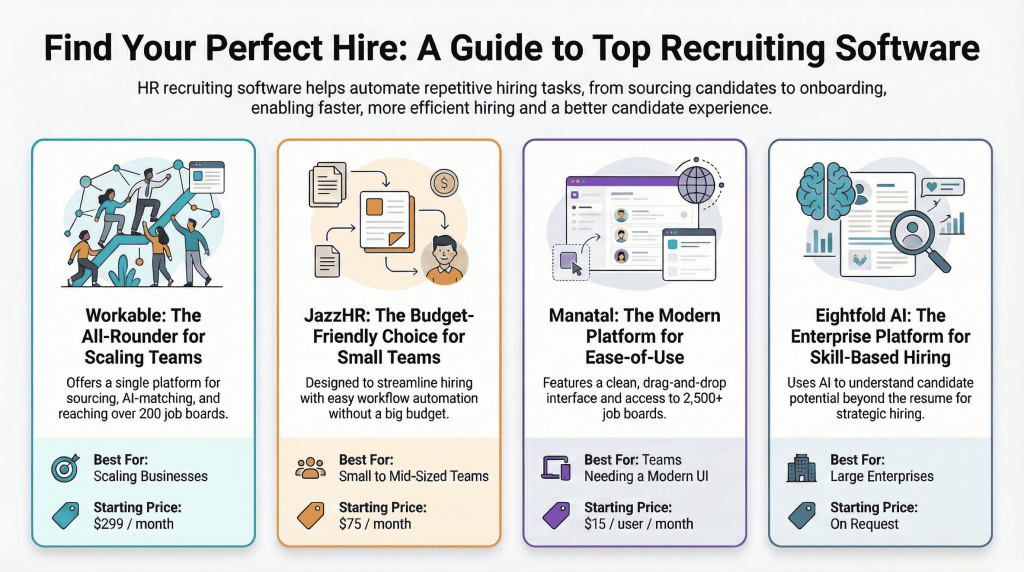
2. Supporting hiring and recruiting
Many HR platforms include applicant tracking tools. These tools help employers manage job openings, applications, interview steps, hiring decisions, and offer letters.
Recruiting functions may include:
- Creating job requisitions
- Posting jobs to selected career sites
- Collecting applications
- Sorting candidates by required criteria
- Scheduling interviews
- Recording interview feedback
- Sending emails - Preparing offer documents
- Moving a selected candidate into onboarding
HR software can improve workflow, but it does not remove the need for fair hiring practices. Employers should review automated screening rules for possible bias and avoid using protected characteristics in unlawful ways.
The U.S. Equal Employment Opportunity Commission provides guidance on federal employment discrimination rules. Employers should use that guidance and qualified legal advice when designing hiring practices.
3. Automating onboarding
Onboarding software helps move a new hire from accepted offer to active employee. The system may send forms, assign tasks, collect signatures, and alert managers about unfinished steps.
A U.S. onboarding workflow may include:
- Send the offer letter.
- Collect required personal information.
- Complete Form I-9 steps.
- Collect federal and state tax forms.
- Provide required notices and company policies.
- Set up payroll and benefits.
- Assign training.
- Create system accounts.
- Confirm the employee’s first-day plan.
The employer remains responsible for completing required employment steps correctly. Software can remind users and store records, but it does not make an incorrect process compliant.
4. Processing payroll or sending payroll data
Some HR systems include payroll. Others connect with a separate payroll provider. Payroll features may help calculate:
- Regular wages
- Overtime
- Bonuses
- Commissions
- Paid time off
- Payroll taxes
- Deductions
- Garnishments
- Direct deposits
- Year-end tax forms
Payroll rules vary by federal, state, and local jurisdiction. They may also vary by worker type, work location, pay frequency, and industry.
The U.S. Department of Labor provides information about federal wage and hour requirements. The Internal Revenue Service provides payroll tax guidance. Employers should not assume that an HR platform automatically handles every state or local rule.
Before each payroll run, an authorized person should review unusual changes, such as:
- A large pay increase
- A new deduction
- A sudden overtime spike
- A change in work location
- A terminated employee still appearing on payroll
- A new bank account
5. Tracking time, attendance, and leave
Time and attendance tools record when employees work. Depending on the system, they may support clocks, mobile entries, schedules, overtime alerts, and manager approvals.
Leave tools may track:
- Vacation
- Sick time
- Personal time
- Holidays
- Family and medical leave
- Jury duty
- Bereavement leave
- Company-specific leave
The system should reflect the employer’s written policy and the rules that apply in each work location. A software setting is not a substitute for reviewing whether the policy itself meets legal requirements.
For hourly employees, accurate time records are especially important. Managers should understand how to correct missed punches and how to handle work performed outside scheduled hours.
6. Administering employee benefits
Benefits modules help employees enroll in and manage programs such as:
- Health insurance
- Dental and vision plans
- Retirement plans
- Health savings accounts
- Flexible spending accounts
- Life insurance
- Disability insurance
- Commuter benefits
The system may show plan choices, collect elections, send eligibility alerts, and transfer data to benefit carriers.
Employers should confirm who is responsible for final enrollment records. A system may display an election without proving that the carrier received it. Clear confirmation steps can help prevent coverage errors.
7. Supporting performance management
Performance management tools help organizations plan and record employee reviews. They may support goals, check-ins, feedback, ratings, development plans, and review approvals.
A useful performance process should explain:
- What employees are measured against
- Who provides feedback
- How often reviews occur
- How ratings are used
- How employees can respond
- How records are retained
Software can make reviews easier to schedule and document. It cannot make vague goals fair or improve a weak management process. Managers still need training and clear standards.
8. Managing training and compliance tasks
Learning management features help assign, deliver, and track training. Employers may use them for:
- Workplace safety training
- Harassment prevention training
- Security awareness
- New manager training
- Product or job training
- Policy acknowledgments
- Professional certifications
The system can show who completed an assignment and when. It may also send reminders when training expires.
Completion records are useful, but completion alone does not prove that an employee understood or followed the training. Employers may need tests, demonstrations, manager checks, or other controls.
9. Creating reports and workforce insights
HR software can turn stored data into reports. Common reports include:
- Headcount by department
- Turnover
- Absence
- Overtime
- Open positions
- Time-to-hire
- Training completion
- Compensation by role or location
- Benefits participation
Reports are only as reliable as the data and definitions behind them. For example, “turnover” may mean all separations, voluntary resignations, or only employees who left during a set period.
Before using a report for a major decision, confirm:
- The date range
- The employee population
- The calculation method
- Excluded records
- The source of each data field
10. Supporting offboarding
HR software also helps manage departures. An offboarding checklist may include:
- Recording the final work date
- Calculating final pay
- Ending benefits at the correct time
- Recovering company property
- Removing system access
- Collecting exit feedback
- Storing required records
- Notifying payroll and managers
Offboarding is a control point. Delayed access removal can create security risk, while an incorrect final paycheck can create legal and employee relations problems.
How Does HR Software Work?
HR software works by combining a central employee database with separate tools and workflows. Data enters the system through HR staff, employees, managers, imports, connected applications, or payroll providers.
A typical flow looks like this:
- An employee or HR staff member enters information.
- The system checks required fields and permissions.
- A workflow sends the item to the right approver.
- The approved data updates the employee record.
- A connected system receives the relevant information.
- Reports and reminders use the updated data.
For example, a promotion may begin with a manager request. HR may review the request, a finance user may confirm the budget, and the system may update the employee’s title and pay after approval. A payroll connection may then use the new pay rate.
Common HR software integrations
HR platforms may connect with:
- Payroll systems
- Accounting software
- Benefits carriers
- Retirement plan providers
- Job boards
- Background check services
- Time clocks
- Scheduling tools
- Identity and access management systems
- Collaboration tools
An integration can save time, but it can also spread an error across several systems. Employers should test data transfers and assign ownership for correcting failed or incomplete syncs.
What Are the Benefits of HR Software?
The main benefit of HR software is better control over repeatable work. It can reduce manual entry, improve access to records, and make deadlines easier to track.
Potential benefits include:
- Fewer duplicate records
- Faster onboarding
- Better visibility into employee data
- More consistent approval steps
- Easier payroll preparation
- Clearer leave balances
- More reliable reminders
- Better reporting
- Stronger document organization
- Improved employee self-service
Employee self-service can also reduce routine questions. Workers may update an address, view a pay statement, request time off, or select benefits without waiting for an HR representative.
The value is greater when the software fits the organization’s real process. A complex platform may add work if a small employer only needs basic records and payroll support.
What Are the Limits and Risks?
HR software does not guarantee compliance, accuracy, or good management. It is a tool. The employer remains responsible for decisions, policies, reviews, and oversight.
Common risks include:
Incorrect data
A wrong pay rate, work location, tax setting, or leave balance can cause downstream problems. Use approval rules and periodic audits.
Excessive access
Not every manager needs access to pay, medical, or disciplinary records. Use role-based permissions and review access when employees change jobs or leave.
Poor implementation
A rushed setup can create wrong workflows, duplicate employees, missing documents, and bad reports. Test the system with realistic examples before launch.
Weak vendor controls
Review the provider’s security information, data processing terms, breach response process, backup approach, and service commitments. Do not assume that a well-known brand meets every business requirement.
Overreliance on automation
Automated screening, payroll, and alerts can support work but may still produce errors. High-impact decisions need human review.
Privacy problems
HR data is sensitive. Collect only what the business needs, restrict access, use strong authentication, and establish retention and deletion rules that fit applicable requirements.

How to Choose HR Software
Choose HR software by starting with the work your organization must control. Do not begin with a long feature list.
Step 1: List the current problems
Write down the tasks that create the most delay or risk. Examples include:
- Payroll corrections
- Missed onboarding steps
- Unclear leave balances
- Duplicate employee records
- Manual benefit updates
- Poor reporting
- Scattered documents
Step 2: Define the required functions
Separate required features from optional features.
| Need | Questions to ask |
|---|---|
| Employee records | Can the system store the fields and documents you need? |
| Payroll | Does it process payroll or only send data to another provider? |
| Time tracking | Does it support hourly staff, overtime, and approvals? |
| Benefits | Can it manage eligibility, elections, and carrier transfers? |
| Recruiting | Does it support your hiring stages and approval rules? |
| Reporting | Can you export data and build needed reports? |
| Security | Can you control access and review system activity? |
| Integrations | Does it connect with current payroll, accounting, and benefits tools? |
| Support | What help is available during setup and after launch? |
Step 3: Check U.S. and state requirements
Confirm that the system can support the locations where employees work. Pay, leave, tax, scheduling, and notice requirements may differ across states and cities.
Ask the vendor what the software handles and what the employer must configure or review. Written documentation is better than a broad sales statement.
Step 4: Review total cost
The total cost may include:
- Subscription fees
- Setup or implementation fees
- Payroll charges
- Per-employee fees
- Add-on modules
- Integration fees
- Support fees
- Data migration costs
- Training
- Premium reporting
A low monthly price may not be low after required add-ons are included.
Step 5: Test real workflows
Request a demonstration using your own examples. Test:
- A new hire
- A promotion
- A pay change
- A leave request
- A terminated employee
- A payroll correction
- A manager with limited access
- An employee working in another state
The goal is to see how the system behaves, not just how its feature list reads.
How to Implement HR Software Successfully
A careful implementation begins with clean data and clear ownership.
1. Assign a project owner
Choose one person to coordinate HR, payroll, finance, IT, managers, and the vendor. Define who approves decisions and who handles problems after launch.
2. Clean existing records
Remove duplicates and correct:
- Legal names
- Addresses
- Work locations
- Pay rates
- Employment status
- Manager assignments
- Tax details
- Leave balances
Keep an original copy of important records according to your retention policy.
3. Build simple workflows first
Start with essential tasks, such as employee changes, onboarding, time approval, and leave requests. Add more complex automation after the basic process works.
4. Set access by role
Create separate access levels for employees, managers, HR staff, payroll staff, finance, and system administrators. Test each role with sample accounts.
5. Test before launch
Use both normal and unusual cases. Check calculations, notifications, reports, integrations, permissions, and exports.
6. Train users by job
Employees need a short guide for self-service tasks. Managers need training on approvals and records. HR and payroll staff need deeper training on corrections, reports, and audits.
7. Keep a fallback process
During the first payroll or major enrollment cycle, keep a controlled backup review. Know how to contact support and how to export essential records if the system is unavailable.
8. Audit after launch
Review the first several cycles for errors. Compare system results with prior records and check whether users follow the intended process.
Signs of a successful implementation include:
- Employees can complete basic tasks without constant help.
- Managers approve items on time.
- Payroll data reaches the correct system.
- Reports match defined calculations.
- Access matches job responsibilities.
- HR staff can correct errors without vendor intervention.
Key Takeaways
- HR software manages employee records and HR processes in one digital system.
- Common uses include recruiting, onboarding, payroll, benefits, time tracking, leave, training, performance, reporting, and offboarding.
- HR software can reduce manual work, but it cannot replace human review or legal judgment.
- Data accuracy, access control, privacy, integrations, and vendor support deserve close review.
- U.S. employers should check federal, state, and local requirements before relying on automated workflows.
- The best system is the one that fits the employer’s size, workforce, processes, budget, and risk needs.
Frequently Asked Questions
Is HR software the same as payroll software?
No. Payroll software focuses mainly on paying workers and handling payroll calculations and filings. HR software may cover a wider range of work, such as employee records, recruiting, onboarding, benefits, time tracking, and performance reviews. Some products combine both functions.
Do small businesses need HR software?
A small business may benefit when employee records, payroll, onboarding, or leave tracking become difficult to manage manually. A simple system may be enough. The best choice depends on the number of employees, work locations, payroll needs, and internal HR capacity.
Does HR software make a company legally compliant?
No. It can support compliance by storing records, sending reminders, and applying configured rules. The employer still must set correct policies, enter accurate data, review results, and follow applicable federal, state, and local requirements.
Is cloud-based HR software secure?
Cloud-based software can include security controls such as encryption, access permissions, authentication, backups, and activity logs. Security quality varies by provider and setup. Ask about data protection, breach response, access reviews, retention, and independent security assessments before choosing a system.
How much does HR software cost?
Pricing varies by provider, employee count, features, payroll services, implementation work, and integrations. Compare the full annual cost rather than only the advertised monthly fee. Include setup, support, add-ons, data migration, and required services.
What should an employer do before buying HR software?
Document current problems, list required functions, confirm work locations, review integrations, calculate total cost, check security controls, and test real workflows. Include HR, payroll, finance, IT, managers, and employees in the evaluation when their work will depend on the system.
Conclusion
HR software is used to organize workforce information and manage repeatable employee processes. It can help a U.S. employer handle hiring, onboarding, payroll coordination, benefits, time records, leave, performance, training, reporting, and departures.
Its success depends on more than the software itself. Clean data, clear policies, trained users, secure access, tested integrations, and regular review are just as important. Start with the business problems that need control, then choose a system that solves those problems without adding unnecessary complexity.