

Quick answer: Use artificial intelligence (AI) to automate repeatable business tasks such as customer support, lead entry, scheduling, document processing, reporting, and email sorting. Start with one low-risk workflow, connect AI to your existing tools, add human checks, and measure time saved, accuracy, cost, and customer impact.
Introduction
For U.S. businesses, AI automation can reduce manual work without requiring a full system change. A small firm in Texas, a retailer in New York, or a service company in California can use AI to sort leads, draft replies, summarize calls, and move data between common business tools.
The safest approach is not to automate everything at once. First, find a task that is frequent, rule-based, and easy to review. Then test it with real business data, set clear limits, and keep a person responsible for important decisions.
This guide explains how to use AI for business automation, which tasks are good candidates, how to choose tools, how to protect customer data, and how to calculate whether an automation project is worth the cost.

What Is AI Business Automation?
AI business automation uses software to perform business tasks that usually require human effort. The software may use machine learning, natural language processing, computer vision, or generative AI.
Traditional automation follows fixed rules:
If a customer submits a form, send an email.
AI automation can handle less structured input:
Read the customer’s message, identify the request, set its priority, and send it to the right team.
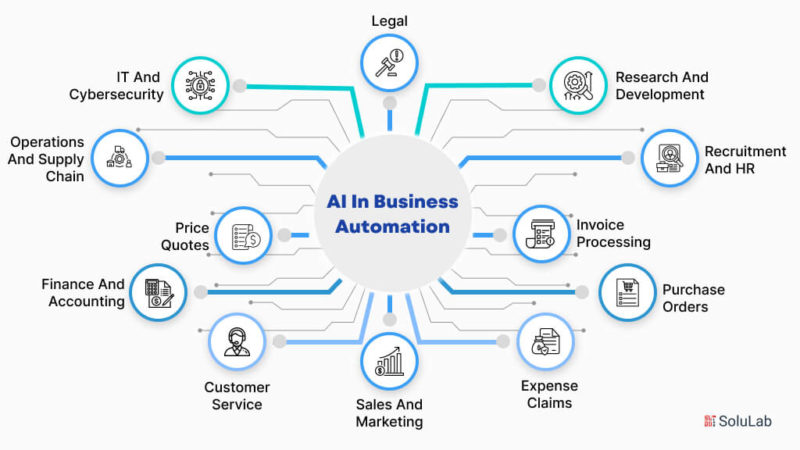
Common AI automation functions include:
- Reading and classifying emails
- Summarizing meetings and calls
- Extracting data from invoices
- Drafting customer service replies
- Scoring or routing sales leads
- Detecting unusual transactions
- Creating reports from business data
- Forecasting demand
- Translating or rewriting text
- Searching internal company documents
AI does not remove the need for business rules. It works best when it handles the first step, while a person reviews sensitive, costly, or unusual cases.
AI automation versus standard automation
Standard automation is often more predictable. It works well when the input and output are clear.
AI is useful when the input contains text, images, speech, or other information that is difficult to process with simple rules. The trade-off is that AI may make errors or produce different results from similar inputs.
| Type of automation | Best use | Main strength | Main risk |
|---|---|---|---|
| Rule-based automation | Fixed steps and forms | Predictable results | Limited flexibility |
| AI-assisted automation | Text, documents, speech, and patterns | Handles varied input | May make errors |
| Human-led automation | Sensitive decisions | Strong judgment | Higher labor cost |
| Hybrid automation | Most business workflows | Balances speed and control | Requires clear handoff rules |
The best business process often uses a hybrid model. AI handles routine work, software applies set rules, and a person handles exceptions.

Which Business Tasks Should You Automate First?
Start with tasks that happen often, take time, use clear data, and have a low cost of failure. Avoid automating a task simply because it sounds advanced.
A useful first project usually has these traits:
- It happens every day or every week.
- Staff members repeat the same steps.
- The required data is already available.
- A human can check the result.
- An error will not cause serious harm.
- Success can be measured.
Good first use cases
1. Email sorting and routing
AI can classify incoming messages by topic, urgency, customer type, or department. It can then create a task in a help desk or customer relationship management system.
For example, an HVAC company could sort messages into:
- New service request
- Existing appointment
- Billing question
- Emergency issue
- General information
A human should review emergency messages and any message that suggests a safety risk.
2. Customer support drafts
AI can read a support request and draft a reply from an approved knowledge base. A support agent can review and send the message.
This approach is safer than allowing AI to answer every customer without review. It also helps keep answers consistent across email, chat, and social media.
3. Lead capture and qualification
AI can extract a person’s name, company, location, service need, and preferred contact time from a form or email. It can place the lead in a CRM and assign it to the correct sales representative.
Do not let AI reject a person based only on a prediction. Use it to organize and prioritize leads, not to make hidden or unfair decisions.
4. Meeting notes and follow-up
AI can create a transcript, summary, task list, and follow-up email after a meeting. Employees should check names, dates, commitments, and confidential details before sharing the summary.
Before recording a call, check the consent rules that apply to the states where participants are located. U.S. call-recording laws can differ by state.
5. Invoice and receipt processing
AI can read documents and extract:
- Vendor name
- Invoice number
- Date
- Total
- Tax
- Purchase order number
- Payment terms
Set a review rule for unusual amounts, new vendors, missing purchase orders, and duplicate invoices. Do not let a document-reading system approve payment without suitable controls.
6. Internal knowledge search
A company can connect an AI assistant to approved internal documents. Employees can then ask questions about policies, product details, procedures, or training material.
The system should show the source document or link when possible. This makes it easier for the employee to verify the answer.
Tasks that need extra care
Use stricter controls for tasks involving:
- Hiring, firing, promotion, or employee ranking
- Credit, lending, insurance, or housing
- Medical information
- Legal advice
- Payroll and tax filings
- Financial transfers
- Customer identity checks
- Biometric data
- Children’s information
- Safety-critical equipment
Federal and state rules may apply to these areas. The Equal Employment Opportunity Commission has warned that AI tools used in employment can create discrimination risks. The Federal Trade Commission also expects businesses to avoid unfair or deceptive claims and practices.
A strong rule is simple: the greater the effect on a person, the stronger the human review should be.

How to Create an AI Automation Plan
A good plan begins with the workflow, not the AI tool. Write down what happens today before choosing software.
Step 1: Map the current process
Document each step from start to finish.
For a customer inquiry, the process might be:
- A customer sends an email.
- An employee reads the email.
- The employee identifies the request.
- The employee copies details into the CRM.
- The employee assigns the request.
- The employee sends a reply.
- The employee sets a follow-up date.
Mark which steps are slow, repeated, unclear, or prone to mistakes.
Step 2: Choose one narrow goal
Avoid a goal such as “use AI across the business.” Choose a measurable goal instead.
Examples include:
- Reduce manual email sorting by 50%.
- Cut invoice entry time by 30 minutes per day.
- Draft first replies within five minutes.
- Reduce missed sales follow-ups.
- Create a meeting summary within 10 minutes.
A narrow goal makes testing easier and limits risk.
Step 3: Identify the inputs and outputs
List what the system receives and what it must produce.
Inputs may include:
- Emails
- Web forms
- PDFs
- Spreadsheets
- Audio files
- CRM records
- Chat messages
Outputs may include:
- A category
- A summary
- A draft reply
- A new task
- A database record
- An alert
- A report
If the input is incomplete or unreliable, the AI result will be less useful. Improve the data before adding more automation.
Step 4: Set the human approval point
Decide where a person must review the work.
For example:
- AI may draft a refund reply.
- A customer service agent must approve the refund.
- AI may flag a suspicious invoice.
- The finance manager must approve payment.
- AI may rank a lead by stated buying signals.
- A salesperson must decide how to follow up.
Write the rule in plain language. Employees should know when they can trust the workflow and when they must stop it.
Step 5: Select the right tool
Tools usually fall into four groups:
- AI assistants: Useful for writing, research, summaries, and questions.
- Workflow platforms: Connect apps and trigger actions.
- Business software with built-in AI: Adds AI to CRM, accounting, support, or marketing systems.
- Custom applications: Built for special data, rules, or internal systems.
Choose the simplest option that meets the need. A custom system may offer more control, but it also requires more design, testing, security work, and maintenance.
Step 6: Test with a small sample
Use a controlled test before turning on automatic actions.
A practical test may include:
- 50 to 100 past emails
- A set of normal and unusual invoices
- Several customer questions
- Different document formats
- Examples with missing data
- Examples that require escalation
Measure both correct results and harmful errors. A high average accuracy may still hide a serious failure in a small but important group.

How to Connect AI to Your Existing Business Tools
AI automation usually works through an application programming interface, or API. An API lets one software system send data to another.
A basic workflow may look like this:
- A new email enters the inbox.
- The workflow tool sends the message to an AI service.
- The AI service returns a category and summary.
- The workflow checks the category.
- The CRM receives the approved fields.
- A staff member reviews the result.
- The system logs the action.
Common connections include:
- Gmail or Microsoft Outlook
- Salesforce, HubSpot, or another CRM
- QuickBooks or another accounting system
- Slack or Microsoft Teams
- Help desk software
- Online forms
- Cloud storage
- Project management tools
Use structured fields
Ask the AI system to return fixed fields instead of a long paragraph.
For lead intake, useful fields may include:
customer_name
company_name
email
phone
service_requested
location
urgency
next_action
needs_human_review
Structured outputs make it easier to validate the result and move it into another system.
Add error handling
Every workflow should define what happens when something goes wrong.
Send the item to a human when:
- Required information is missing.
- The AI gives a low-confidence result.
- The message contains a threat or safety concern.
- The request involves a refund or legal issue.
- The amount exceeds a set limit.
- The system cannot identify the customer.
- The output does not match the required format.
Do not let a failed AI response silently disappear. Store the item, record the error, and alert the right person.
Keep an audit trail
Record:
- When the workflow ran
- Which input it used
- What the AI returned
- What action the system took
- Who approved or changed the result
- Which version of the prompt or workflow was active
An audit trail helps you investigate mistakes and improve the process.
How to Protect Business and Customer Data
AI automation can expose sensitive data if a business sends information to the wrong service or gives a system too much access.
Before using an AI tool, review its:
- Data retention terms
- Use of customer data for model training
- Security controls
- User access settings
- Data location and transfer terms
- Deletion process
- Breach notification terms
- Subprocessor list
- Contract terms for business data
Do not paste private customer data into a public AI chat tool unless your organization has approved that use.
Use data minimization
Send only the information needed for the task. A customer support summary may not need a full payment card number, Social Security number, or complete medical record.
Where possible:
- Remove sensitive fields.
- Mask account numbers.
- Use internal customer IDs.
- Limit access by role.
- Set data retention periods.
- Delete temporary files.
- Separate test data from production data.
Apply U.S. privacy requirements
The United States does not have one broad federal privacy law that covers every business and every type of data. Requirements may come from federal laws, state laws, sector rules, contracts, and industry standards.
Depending on the business, relevant rules may include:
- The California Consumer Privacy Act and related California rules
- State consumer privacy laws
- The Health Insurance Portability and Accountability Act for covered health data
- The Gramm-Leach-Bliley Act for certain financial institutions
- The Fair Credit Reporting Act for certain consumer report uses
- The Children’s Online Privacy Protection Act for covered services
- Federal Trade Commission rules against unfair or deceptive practices
The NIST AI Risk Management Framework provides a voluntary U.S. framework for managing AI risks. It emphasizes governance, mapping, measurement, and risk management.
Legal duties depend on the facts. Ask a qualified attorney or privacy professional before automating regulated decisions or processing sensitive data at scale.

How to Measure the Value of AI Automation
Measure the old process before measuring the new one. Otherwise, you may mistake activity for savings.
Track these metrics:
- Minutes spent per task
- Number of tasks per week
- Error rate
- Rework time
- Response time
- Customer satisfaction
- Employee satisfaction
- Cost per completed task
- Escalation rate
- Percentage of tasks completed without correction
A simple savings calculation
Use this formula:
Monthly labor savings =
tasks per month × minutes saved per task ÷ 60 × hourly labor cost
Hypothetical example:
- 1,200 emails per month
- 4 minutes saved per email
- $28 hourly labor cost
1,200 × 4 ÷ 60 × $28 = $2,240 in monthly labor value
Then subtract:
- AI subscription fees
- Workflow platform fees
- Setup costs
- Review time
- Training
- Maintenance
- Security and legal costs
The result is an estimate, not a guarantee. Time saved does not always become cash saved. Employees may use the extra time for sales, service, quality work, or other valuable tasks.
Measure quality as well as speed
A faster process can be worse if it creates incorrect records or poor customer replies.
Set a quality threshold before launch. For example:
- At least 95% correct routing
- No unapproved refunds
- Zero exposure of restricted data
- Human review for every low-confidence result
- Fewer than two corrected records per 100 items
The right threshold depends on the task and the harm caused by an error.

Common AI Automation Mistakes
Automating a broken process
AI can make a poor process run faster without making it better. Remove duplicate steps and clarify ownership first.
Giving AI too much authority
Do not allow an AI system to send money, delete records, terminate accounts, or make major decisions without controls.
Using vague instructions
A prompt such as “handle this customer” is unclear. State the role, source material, required output, limits, and escalation rules.
Ignoring unusual cases
Test empty forms, angry messages, duplicate invoices, spelling errors, mixed languages, large files, and incomplete records.
Failing to train employees
Employees need to know what the system does, what it does not do, and how to report an error. Training also reduces the risk that staff will place confidential data into unapproved tools.
Measuring only output volume
More automated messages do not prove success. Measure correct results, customer outcomes, staff time, and risk.
Treating AI output as fact
Generative AI can produce false or unsupported information. Require source checks for policies, prices, technical details, legal claims, and customer account data.
A Practical 30-Day AI Automation Launch Plan
Days 1–5: Find the first workflow
List repeated tasks. Estimate volume, time, error cost, and data sensitivity. Select one low-risk process.
Days 6–10: Map the process
Write each step. Define the input, output, approval point, exception rules, and success metrics.
Days 11–15: Choose and configure the tool
Review security terms and access settings. Connect only the systems needed for the test.
Days 16–20: Test past examples
Use normal cases and difficult cases. Compare AI results with results reviewed by trained staff.
Days 21–25: Run a limited live pilot
Allow the system to assist with a small share of work. Keep human approval enabled and record every correction.
Days 26–30: Review the results
Compare the pilot with the old process. Check time, quality, cost, data handling, and employee feedback. Expand only if the results meet the agreed threshold.
Frequently Asked Questions
Is AI automation suitable for a small business?
Yes. Small businesses can begin with one narrow task, such as email sorting, appointment reminders, document extraction, or meeting summaries. A small pilot is often easier to manage than a large system change.
How much does AI business automation cost?
Costs vary by tool, usage, integrations, setup, and review needs. Some tools charge per user, while others charge per task, document, API call, or amount of data processed. Calculate the full cost, including staff review and maintenance.
Can AI automate customer service without employees?
It can answer some routine questions, but full replacement creates risk. A human should handle complaints, unusual requests, refunds, account access issues, threats, safety concerns, and sensitive personal data.
What business data should not be entered into public AI tools?
Avoid entering passwords, payment card data, Social Security numbers, private health information, confidential contracts, trade secrets, and personal customer records unless the tool and use have been approved for that data.
How do I know whether an AI workflow is accurate?
Test it against examples with known answers. Measure correct results, harmful errors, missing information, escalation behavior, and the amount of human correction. Continue testing after software or prompt changes.
Final Recommendation
Use AI for business automation as a controlled assistant, not as an unchecked decision-maker. Begin with a frequent, low-risk process that has clear inputs and measurable results. Keep human review for sensitive actions, protect personal data, log system activity, and expand only after the pilot proves its value.
For U.S. businesses, the strongest starting workflow is often one that saves staff time while leaving the final customer, financial, employment, or legal decision with a qualified person.