
Introduction
Software as a service (SaaS) is software that you use online instead of installing and maintaining it on your own computer or company server. In the United States, common SaaS examples include Gmail, Microsoft 365, Salesforce, Slack, Zoom, Dropbox, and QuickBooks Online.
A SaaS provider hosts the software, runs its servers, applies updates, and manages much of the technical upkeep. Customers usually access the service through a web browser or mobile app and pay a subscription, although some services offer free plans or usage-based pricing.
In simple terms, SaaS turns software into an online service. You log in, use the features you need, and the provider handles the infrastructure behind the service.

What Does SaaS Mean?
SaaS stands for software as a service. It is one of the main cloud computing service models, alongside infrastructure as a service (IaaS) and platform as a service (PaaS).
With traditional software, a person or company may need to:
- Buy a software license
- Download or install the program
- Maintain local servers or computers
- Install updates
- Manage backups
- Fix compatibility problems
- Pay for upgrades
With SaaS, the provider usually manages these tasks. The customer accesses the software through the internet and pays according to the provider’s terms.
The National Institute of Standards and Technology (NIST) describes cloud software as a service as a model in which a customer uses the provider’s applications through a browser or program interface. The provider controls the underlying cloud infrastructure.
SaaS examples
SaaS products serve many business and personal needs:
| Need | SaaS example |
|---|---|
| Email and documents | Gmail, Google Workspace, Microsoft 365 |
| Customer management | Salesforce, HubSpot |
| Team communication | Slack, Microsoft Teams |
| Video meetings | Zoom, Google Meet |
| Accounting | QuickBooks Online, Xero |
| File storage | Dropbox, Box, OneDrive |
| Project management | Asana, Trello, Monday.com |
| Online design | Canva, Adobe Creative Cloud |
The software does not need to be entirely browser-based to qualify as SaaS. Some SaaS providers offer desktop or mobile apps that connect to the provider’s online service.
How Does SaaS Work?
SaaS works by placing the application, data systems, and supporting infrastructure in a provider-managed cloud environment. The customer connects to that environment through the internet.
A typical SaaS process looks like this:
- You create an account.
- The provider checks your login details.
- The service connects you to the correct account and permissions.
- You use the software in a browser or app.
- Your changes travel to the provider’s servers.
- The provider stores and processes the data.
- The service sends the result back to your screen.
For example, when you edit a document in an online office app, the document may be stored in the provider’s cloud system. The service records your changes and may sync them across your approved devices.
The main parts of a SaaS system
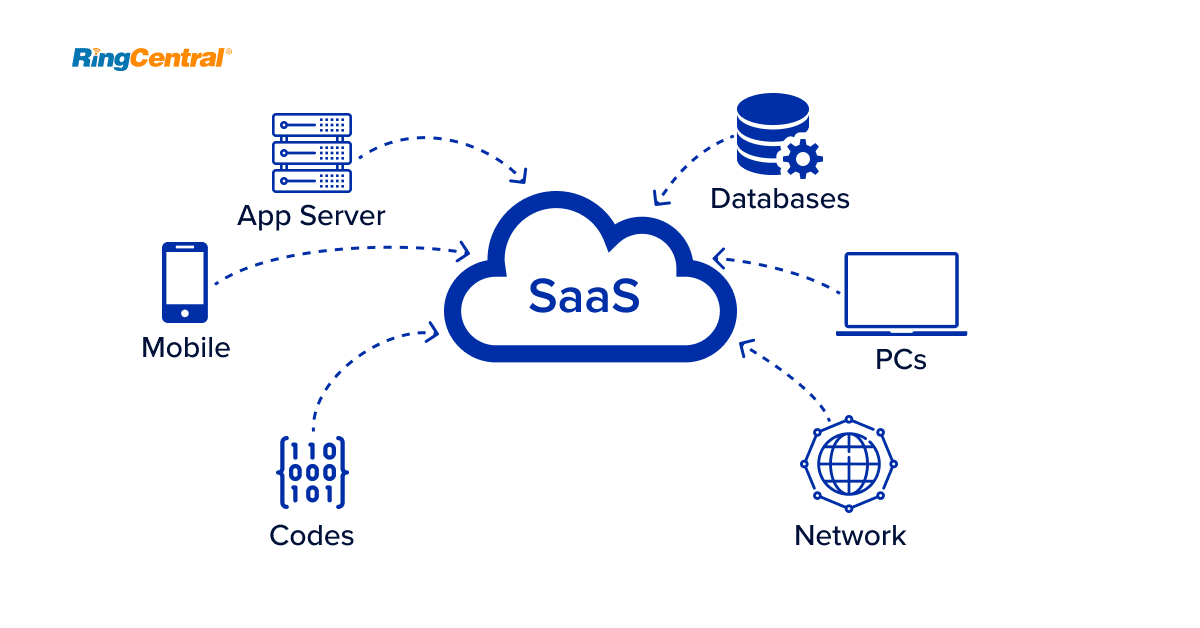
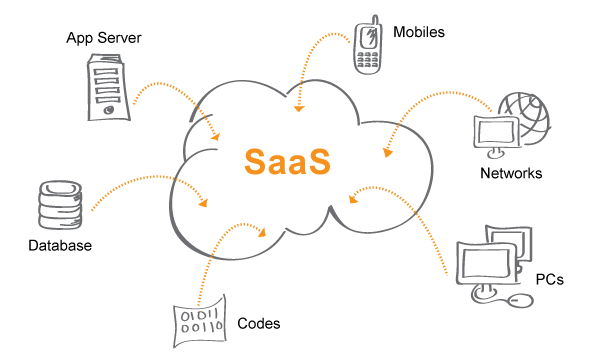
A SaaS platform commonly includes:
- Application layer: The features users see and use
- User interface: The website, mobile app, or desktop app
- Application programming interfaces: Tools that let other software connect to the service
- Databases: Systems that store account data and business records
- Cloud infrastructure: Servers, storage, networks, and security tools
- Identity and access controls: Systems that manage logins and permissions
- Monitoring tools: Systems that track errors, performance, and service health
- Backup and recovery systems: Tools that help restore data after certain failures
The provider may run this infrastructure in its own data centers or through a cloud infrastructure company such as Amazon Web Services, Microsoft Azure, or Google Cloud. The exact design varies by provider.

What Happens When You Log In to a SaaS App?
Logging in to a SaaS application starts an identity and access process. The service must confirm who you are and determine what you can do.
A simplified login flow is:
- You enter your email address and password.
- The service checks the credentials.
- If enabled, the service requests a second factor, such as a code or security key.
- The service creates a secure session.
- The application loads the data and features allowed for your account.
Businesses may connect SaaS login systems to a central identity provider. This can support single sign-on, automated employee access, and faster account removal when someone leaves the company.
Access controls also affect what each user can see. For example, an employee may view customer records but not billing settings. An administrator may manage users, while a regular user cannot.
Multi-tenant and single-tenant SaaS
Many SaaS providers use a multi-tenant architecture. In this design, one software system serves multiple customers. Each customer’s data remains separated through application controls, database rules, and access permissions.
Multi-tenancy can help providers operate at scale. It may also support faster updates because the provider manages a common software version.
Some providers offer single-tenant environments. In this model, one customer receives a separate application environment or infrastructure area. Single-tenant hosting may support special isolation or customization needs, but it can cost more and require more management.
The label alone does not prove that one design is safer. Security depends on the provider’s architecture, controls, testing, monitoring, and response practices.
How Is SaaS Different From Traditional Software?
The main difference is who manages the software and where the software runs.
| Feature | SaaS | Traditional installed software |
|---|---|---|
| Installation | Usually handled by the provider | Customer installs it |
| Access | Usually through the internet | Often through a local computer or network |
| Updates | Provider usually manages them | Customer or IT team manages them |
| Payment | Often subscription-based | Often license-based, though models vary |
| Data storage | Usually provider-managed cloud storage | Often local or company-managed storage |
| Scaling | Often available through plan changes | May require new hardware or licenses |
| Internet need | Commonly required for full access | May work offline, depending on the product |
| Maintenance | Shared, with the provider handling the service | Mostly handled by the customer |
This comparison has exceptions. Some SaaS applications support offline work, and some traditional software uses subscriptions or cloud features. The key question is not the payment method. It is who hosts, updates, and operates the application.
SaaS versus cloud computing
Cloud computing is the broader category. SaaS is one cloud service model.
- SaaS: You use a finished application.
- PaaS: Developers use a managed platform to build and run applications.
- IaaS: Technical teams rent computing, storage, and networking resources.
A company using an online payroll application is using SaaS. A developer deploying a custom app on a managed cloud platform may be using PaaS. An IT team renting virtual machines and configuring them directly is using IaaS.

How Do SaaS Companies Make Money?
Most SaaS providers charge through recurring revenue. The exact cost depends on the product, number of users, features, storage, support, and usage.
Common SaaS pricing models include:
- Per-user pricing: A charge for each licensed user
- Tiered pricing: Different plans offer different features
- Usage-based pricing: Cost changes with storage, messages, transactions, or API calls
- Flat-rate pricing: One price covers a defined package
- Freemium pricing: A basic plan is free, with paid upgrades
- Hybrid pricing: Combines a base fee with user or usage charges
A simple SaaS cost calculation
Suppose a service charges:
- $25 per user each month
- 12 users
- $100 per month for a premium add-on
The estimated monthly software cost is:
($25 × 12) + $100 = $400 per month
The estimated annual cost is:
$400 × 12 = $4,800 per year
This calculation does not include possible taxes, setup fees, data migration, consulting, training, or costs for connected tools.
Before signing up, check:
- Minimum user commitments
- Annual versus monthly billing
- Price changes at renewal
- Storage limits
- API or integration fees
- Data export charges
- Premium support costs
- Cancellation terms
- Whether inactive users still incur fees
A low monthly price may not be the lowest total cost if the service requires many add-ons.
What Are the Benefits of SaaS?
SaaS can reduce the technical work required to adopt and operate software. Its value depends on the product, provider, contract, and business needs.
Faster setup
A SaaS application may be ready soon after account creation. A business often does not need to buy servers or build a local installation system.
Automatic updates
The provider usually applies patches, fixes, and feature updates. This can reduce maintenance work for internal IT staff.
Automatic updates can also create risk. A change may affect workflows, integrations, or user training. Businesses should review release notes and test important changes when the provider allows it.
Easier access
Users can often access SaaS from different locations and approved devices. This can support remote work and distributed teams.
Access still depends on internet service, device security, account controls, and the provider’s availability.
Flexible scaling
Many SaaS services let an organization add users or change plans without buying new hardware. This can help a growing company.
Scaling up is not always simple. A larger plan may change costs, permissions, support levels, or contract terms.
Lower upfront infrastructure costs
SaaS may avoid the need for large purchases of servers and installation tools. However, subscription costs continue over time, so buyers should compare the full cost over the expected period of use.
What Are the Disadvantages and Limits of SaaS?
SaaS does not remove all technology risks. It changes who manages parts of the system.
Internet dependence
Many SaaS products need an internet connection. A network outage may prevent access or limit key features.
Before choosing a service, check whether it supports offline work, data downloads, backup access, or emergency procedures.
Less direct control
The provider controls much of the infrastructure and software schedule. Customers may have limited control over server settings, update timing, or product changes.
This matters when a business needs a stable workflow, a specific feature, or strict system requirements.
Vendor lock-in
Moving data from one SaaS platform to another may take time and money. A provider may use special data formats or offer only limited export tools.
Ask how to export:
- Account records
- Files
- Messages
- Reports
- Audit logs
- Metadata
- Automated workflows
Test an export before relying on it. A feature listed as “data export” may not include every type of data.
Ongoing subscription cost
A subscription can be easier to start but more expensive over a long period. Calculate the total cost for the time you expect to use the service.
Service outages
A provider can experience downtime, slow performance, or regional failures. Review the provider’s status history, service-level terms, support options, and incident process.
Data location and compliance
Some organizations have legal, contractual, or industry rules about data handling. The provider’s storage locations, subcontractors, retention rules, and security controls may affect whether the service fits.
A compliance badge alone does not prove that a service meets every customer obligation. The customer must assess the service in its own legal and operational context.
Is SaaS Secure?
SaaS security is a shared responsibility. The provider protects the service infrastructure, while the customer must protect accounts, users, settings, and data use.
The exact division varies by provider and contract. Customers commonly remain responsible for:
- Strong passwords
- Multifactor authentication
- User permissions
- Device security
- Safe sharing settings
- Connected applications
- Data retention choices
- Employee training
- Reviewing access logs
SaaS security checklist
Before adopting a SaaS product, ask:
- Does the service support multifactor authentication?
- Can administrators apply role-based access?
- Does it offer single sign-on?
- Can the company review login and activity logs?
- How does the provider encrypt data in transit and at rest?
- How often does the provider test backups?
- What happens after an account is canceled?
- Can the customer export its data?
- Does the provider publish security documentation?
- How does the provider report security incidents?
- Which vendors or subprocessors can access the data?
- Can administrators limit external sharing?
The Federal Trade Commission advises businesses to use reasonable safeguards for personal information. A SaaS provider can support that work, but it cannot replace the customer’s own security program.

How Should You Choose a SaaS Product?
Choose SaaS based on business fit, risk, total cost, and the ability to leave the service later. Do not choose only by the number of features.
Use this process:
1. Define the task
Write down the problem the software must solve. Include who will use it, how often they will use it, and what result they need.
2. List required integrations
Check whether the service connects with the tools you already use. Confirm supported versions, permissions, data direction, and any extra fees.
3. Review security and privacy terms
Read the privacy policy, security documentation, service agreement, data processing terms, and breach notification process.
4. Test the core workflow
Use a trial or demonstration to perform the tasks that matter most. Do not judge the service only by its presentation or feature list.
5. Calculate the full cost
Include licenses, storage, setup, migration, training, support, integrations, and cancellation costs.
6. Plan data migration and exit
Ask how you will import current data and export it later. Confirm the format, timing, cost, and scope of the export.
7. Start with a controlled rollout
Begin with a small group when practical. Track errors, user feedback, support requests, and workflow changes before expanding access.
A practical decision table
| Question | Favor SaaS when… | Seek another option when… |
|---|---|---|
| Speed | You need a working tool soon | You need extensive custom development |
| IT resources | Your team wants less infrastructure work | You need direct server control |
| Access | Users work across locations | Users need reliable offline access |
| Cost | Predictable monthly spending fits | Long-term subscription cost is too high |
| Data | The provider meets your data needs | You need strict control over hosting |
| Updates | Regular provider updates are useful | You need fixed versions and change control |

Common SaaS Mistakes to Avoid
Several mistakes can create avoidable cost or risk.
Buying too many seats
Review active users and license assignments. Remove unused accounts when contract terms allow it.
Ignoring administrator accounts
Protect administrator accounts with multifactor authentication, separate admin identities, and limited privileges.
Assuming backups are automatic
A provider may back up its infrastructure without offering the customer a complete, restorable copy of all account data. Read the backup terms and test recovery.
Skipping the exit plan
Even if you expect to use the service for years, document how to export data and close the account.
Treating compliance as automatic
A provider’s certification or report may cover only certain systems, dates, and controls. Match the evidence to your own obligations.
Connecting tools without review
Integrations can copy data between systems. Review permissions and remove connections that are no longer needed.
Failing to train users
Many SaaS incidents begin with weak passwords, unsafe sharing, or phishing. Basic user training can reduce these risks.
Key Takeaways
- SaaS means software as a service.
- You use SaaS through the internet while the provider hosts and maintains the application.
- The provider usually manages infrastructure, updates, and much of the system operation.
- Customers still manage account security, permissions, data use, and internal processes.
- SaaS can offer quick setup, flexible access, and lower upfront infrastructure costs.
- Main risks include outages, recurring fees, vendor lock-in, data loss, and limited control.
- Review security, pricing, integrations, data export, and cancellation terms before adopting a service.
Frequently Asked Questions
Is SaaS the same as cloud software?
Not always. SaaS is a type of cloud software that delivers a complete application to users. Cloud software can also refer to platforms and infrastructure that customers use to build or operate their own applications.
Do I need to install SaaS?
Usually, no. Most SaaS products work in a web browser. Some providers also offer optional mobile or desktop apps, but the main service remains hosted by the provider.
Can SaaS work without the internet?
Some SaaS apps offer limited offline features. Full access often requires an internet connection because the application and data run on the provider’s systems. Check the specific product’s offline policy before relying on it.
Who owns the data in a SaaS application?
The contract usually explains data ownership and the provider’s rights to process the data. Ownership, access, retention, and export rules differ by service. Read the agreement instead of assuming that the account holder has unlimited control.
Is SaaS cheaper than installed software?
It can be cheaper to start because it may avoid hardware and installation costs. Over several years, subscriptions may cost more than a one-time license. Compare the full cost over the time you expect to use the software.
What happens if a SaaS provider shuts down?
Your options depend on the provider’s terms and your backups. Maintain regular exports of important data when allowed, document alternative tools, and avoid storing critical records in a service with no practical recovery plan.
What is the next step after choosing SaaS?
Start with a written requirements list. Then compare qualified services by total cost, security controls, integrations, user needs, data export, and cancellation terms. Test the most important workflow before a full rollout.
Conclusion
SaaS is a way to use software as an online service rather than manage the full installation and infrastructure yourself. The provider operates the application, while the customer manages users, access, business settings, and responsible data use.
For a sound decision, look beyond convenience. Check the total cost, security model, service reliability, integration limits, data export process, and contract terms. A SaaS product is a good fit when its benefits outweigh the loss of direct control for your specific needs.